Lights
Clustered Lighting
Unia uses clustered lighting, this divides the scene into 8x8x8 metre cubes, in the shader, the fragment will only use the lights affecting it's local area. This significantly improves the perfomance for scenes with many lights. The option for 4x4x4 and 2x2x2 grid sizes is coming soon (better suited for smaller scenes with densely populated lights).
General Light settings
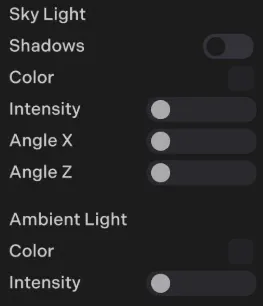
You can find Sky and Ambient light settings in: Edit->Scene Settings
Ambient Occlusion
To enable ambient occlusion, open the scene settings in the scene panel and use the A.O. slider.
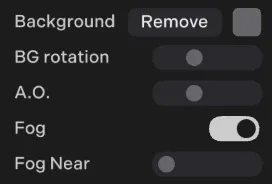
Unia uses an AO method similar to Distance Field Ambient Occlusion (DFAO). This is run in a forward renderer (no post processing) and typically has less than 10% of the overhead of SSAO for mobile GPU architectures. It is in world space so can be used for VR. It is generally more accurate than SSAO for medium-large scale occlusion, however it is not as well suited for fine detail, dynamic occlusion.
// Set before adding the object to the scene. Only explicit false opts out.
object.AO = false;
Reflections and global illumuniation
You can modify how reflective and rough a surface is in the material panel:
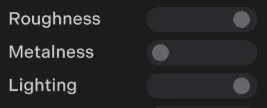
For approximate global illumination use a low metalness and high roughness, and for sharp reflections use a higher metalness and lower roughness. You can also use the lighting slider to interpolate between flat shading (no lights) to standard PBR lighting.
Reflection Probes
To add a reflections go to: Edit-> + (add an object) -> Reflection probe.
Spherical projection
This works best for open spaces for curved surfaces and uses standard cubemaps.
Box projection
This is best suited for enclosed box-like spaces such as interiors. To setup a box reflection expand the box area to fit the dimensions of the space. When working well this can look close to realtime ray-tracing where reflections allign correctly within the world space. Box projections also have depth allignment so in VR you will perceive the depth of the reflection!
Updating probes
reflectionProbe.updateProbe(); // update a probe at runtimeMaterial-assigned runtime probes
world.reflectionProbes holds up to 64 probes. Create a probe after the renderer has initialized and assign only the materials that should use its reflection:
const probe = world.reflectionProbes.create({ x: 10, y: 1.5, z: 20 }, {
    materials: [interiorWallMaterial, floorMaterial, ceilingMaterial],
    maxDistance: 40, // metres; capture geometry within this distance
    samples: 32, // GGX filtering samples (1–128)
});
await probe.ready;
probe.assign(anotherMaterial);
await probe.update(); // capture again after scene changes
await probe.update({ x: 12, y: 1.5, z: 20 }); // move and recapture
probe.dispose(); // release the slot and restore previous assignments
Captures run sequentially, one cubemap face per rendered frame, followed by roughness filtering. Materials keep their original environment map until the first capture finishes; regenerating keeps the previous capture visible. Moving the camera does not regenerate probes. Repeated update calls during an existing capture return that capture's promise. Dispose probes during script cleanup; world.reflectionProbes.clear() disposes all probes.
Each assigned surface samples one 128×64 HDR environment map with eight roughness mip levels. Assignments affect every object sharing the material, so clone shared materials to isolate rooms or levels. The full 64-layer texture uses about 5.3 MiB, plus capture scratch resources.
These runtime probes currently support unmasked, non-skinned mesh materials and use spherical environment projection. Capture includes nearby visible general meshes, their textures, wind, sky and ambient lighting, and the background; it does not include avatars, local lights, shadows, or recursive reflections. Static impostor baking uses the background fallback. Captures and material assignments are runtime resources and are not saved with the scene.
Planar reflections by ID
Create a world-space reflection plane and select it on any receiving material:
const reflectionId = world.addPlanarReflection(
    { x: 0, y: 0, z: 0 },
    { normal: { x: 0, y: 1, z: 0 }, size: [20, 20] }
);
// Returns an ID from 0 to 7, or -1 for invalid input / full capacity.
floorMaterial.planarReflectionId = reflectionId;
floorMaterial.update();

// The same ID can be used by several materials.
waterMaterial.planarReflectionId = reflectionId;
waterMaterial.update();

// Disable planar reflection on this material, retaining its environment map.
floorMaterial.planarReflectionId = -1;
floorMaterial.update();

world.updatePlanarReflection(reflectionId, { x: 0, y: 2, z: 0 }, {
    normal: { x: 0, y: 1, z: 0 }
});
world.removePlanarReflection(reflectionId); // release during cleanup
A direct normal vector is also accepted as the second argument. Alternatively, pass rotation: { x, y, z, order: 'XYZ' } using Euler angles in radians; rotation transforms the plane's local +Z normal. Specify either normal or rotation. The default normal is world +Y. size is the finite capture area's width and height in metres, defaulting to [20, 20]. There is no visible plane mesh to add to the scene. Updates preserve the existing size and orientation unless supplied again.
The existing mesh registration remains supported. Leaving material.planarReflectionId undefined retains that behavior; setting -1 explicitly disables it. An explicit ID takes precedence over mesh registration. Missing or inactive captures fall back to the material's environment map/background. IDs are shared across both APIs, with eight total slots, and may be reused after removal. Clear material assignments before reusing a slot for an unrelated plane.
Captures update automatically when the camera sees the front of the capture area. Assigned materials use the plane's reflected image; this is most suitable for surfaces lying on that plane, such as a floor or water surface. Supported receivers are general unmasked mesh materials. Avatars, masked materials and custom shaders do not use this material property. IDs and captures are runtime resources, not saved scene assets.