Writing Code
Unia runs Javascript in an unsandboxed environment, this gives you the freedom to do anything within the limits of JS. Scripts are activated only when the scene is playing.
Scripts attached to objects
Each object in a scene can have an unlimited amount of scripts attached to them. Scripts can be used on multiple objects.
To create or attach a script use the UI:
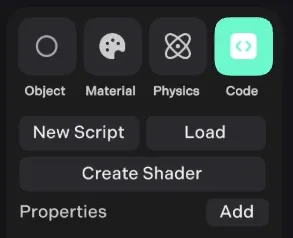
or use:
// attach a script at runtime, will trigger .init() too
world.attachScript(object, "scriptName.js");
In the script you can use 'this' to reference the object
// init is called after the scene has loaded, before the first frame
this.init = () => {
  this.setup = true;
};

// Any other code written outside a function will execute before init
const text = Text("hi!");

// update is called each frame with elapsed time in seconds
this.update = (delta) => {
  this.position.x += velocity * delta;
  this.sync();
  text.position.x = this.position.x;
  text.sync();
};

// This is called when stopping a project
this.onStop = () => {
  // clean up event listeners etc..
};
Scene Graph Management
Unia is designed for large scenes with thousands of objects, unlike libraries like three.js you need to call methods when things are updated. This is for performance reasons, and helps the engine manage large scene graphs.
// Update the object's transform matrix this frame
// Call this if you change an object's position, rotation or scale
object.sync();

// Must be called for proper disposal of object
world.remove(object);

// For scene graph optimisation use setVisible(), not .visible = x
object.setVisible(boolean);
Runtime Model Instances
Configure a clone before adding it to the scene graph:
const template = await Model('unit.glb', true)
const instance = await template.clone()

instance.traverse(object => {
	if (object.geometry) object.collider = false
})

parent.add(instance)
parent.add() is enough to render ordinary model descendants; no extra parent
sync or World registration is needed. Use world.add(instance) for a top-level
object, and register interactive meshes separately with
world.addRaycastable(). See Model for cloning, bounds, and cleanup.
Updating Materials & Geometry
When making any changes to materials or geometry, use the following methods:
// Updating a material
object.material.update();

// Assigning a new material
object.setMaterial(newMaterial);

// Assigning new geometry
object.setGeometry(newGeometry);
index.js
If you create an index.js file, this will be executed before all other scripts.
This can be useful for handling global state, importing libraries and initialisation.
Importing / Modules
You can import modules from your own scripts, or load ES modules from a URL/CDN.
import { EnterSpace, SelectItem } from "./Logic.js"
import * from "./Items.js"
import * as Tone from 'https://cdnjs.cloudflare.com/ajax/libs/tone/15.1.3/Tone.js'
Local Development
If you enjoy the convenience of your local file system and code editor, you can edit locally!
npm install
npm run dev
In your current directory you will see ./Unia/{folder} where each folder contains files of each project you open.
Code
You can find your code in ./Unia/{folder}/code - any changes you make to these files are synced with the editor in the browser.
::: danger Saving local changes Make sure to save any local changes when switching projects. When you open a new project, any local changes to a project will be overwritten when you re-open that project. :::